Feature
Every field a real
tree survey needs.
LogLog's per-tree record isn't a generic form someone bolted arborist labels onto. It's built around the fields consulting arborists and BS5837 practitioners already use — species, DBH, condition, preservation category, risk — so the data you collect matches what your report actually needs.
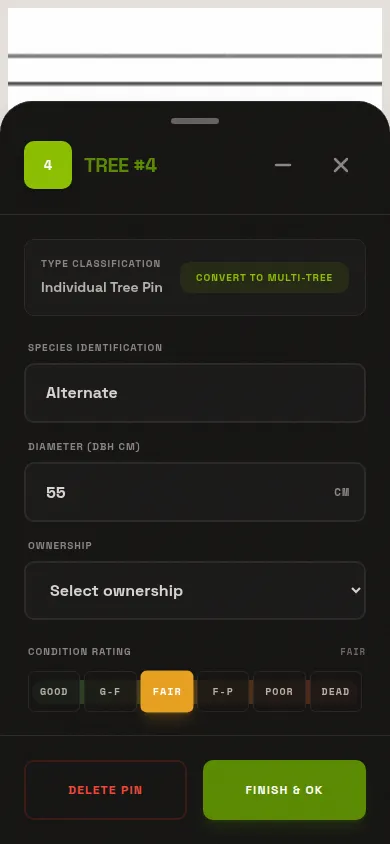
Core fields, visible by default
Species
Free-text field with autocomplete against a built-in list of roughly 120 species, formatted as "Common Name (Botanical name)" — Red Oak (Quercus rubra), for example. Export splits this into separate species and botanical_name columns automatically.
DBH
Diameter at breast height, recorded in centimeters. It's a text field, not a strict number input — because multi-stem trees need a comma-joined list, like "24, 18, 12" for three stems. Type-as-you-go sanitization keeps the list clean without fighting your keyboard mid-entry.
Condition
Six-value scale: good, good-fair, fair, fair-poor, poor, dead. The two transitional values collapse onto their nearest base color in the map view, so a crowded plan still reads at a glance without losing the finer distinction in the export.
Ownership
Private, neighbouring, park, right-of-way, or city — a field that matters the moment a tree sits near a boundary line and someone asks who's responsible for it.
Height & crown spread
Height in meters, plus crown spread measured north-south and east-west independently — most canopies aren't circular. LogLog derives crown diameter and canopy area from those two spread values automatically, so you don't do the math by hand or in a spreadsheet formula later.
Action & heritage
Retain, remove, monitor, treat, transplant, or prune — the recommendation for that tree. A separate heritage flag marks a tree as protected or notable independent of its action.
Six-value condition scale
BS5837 vocabulary
Preservation category A/B/C/U
The standard preservation-category scheme UK BS5837 practitioners already work in — A, B, C, U — is a first-class field, not a custom add-on you'd have to build yourself. It sits right alongside heritage flags and ownership so a full BS5837-style category call is one record, not three separate notes.
TRAQ-adjacent
Risk group
Failure likelihood (improbable / possible / probable / imminent), failure consequence (negligible / minor / significant / severe), an overall risk rating (low / moderate / high / extreme), a target description, mitigation notes, and a reinspect date. These fields are unconditionally included in every export regardless of your visibility settings, so a risk assessment never accidentally drops out of the deliverable.
Appraisal and org-defined custom fields
A species rating and location factor feed a computed monetary appraisal, using theCTLA Trunk Formula Method— trunk cross-sectional area, species rating, condition, and location factor, the same structure insurers and courts expect for tort claims and loss valuations. Appraisal fields are, like risk fields, unconditionally exported.
Your organization can also define its own fields — Text, Number with an optional unit, or Select with an editable option list — from Settings → Fields. Field visibility is configurable per org too: hide what you don't use, show what you do, and every visible field shows up consistently across the editor and the export.
Multi-stem trees, handled properly
A multi-stem tree usually ends up as a footnote in a comments column, or a second row that confuses whoever reads the spreadsheet next — and if you delete one mid-survey, tree numbering can reset into a mess. LogLog gives multi-stem trees their own marker mode with per-stem DBH and condition, and deleting a tree mid-survey just refills the gap for the next tree of that same type. No renumbering the whole plan by hand.
Tree numbering that doesn't drift
Numbering is scoped per project and per marker type — trees, multi-stem trees, and panoramas each get their own sequence. New trees fill the first available gap, so if you delete tree 7 partway through a survey, the next tree of that type you add becomes 7 again rather than pushing every later number up by one.
That matters more than it sounds: a renumbered plan after a mid-survey correction is exactly the kind of thing that causes a client-facing report and an annotated site plan to fall out of sync with each other. First-gap-fill numbering keeps both documents referring to the same tree by the same number, permanently.
See how these fields land in the deliverable on theexports page, or how they map onto pins on thesite plan. UK practitioners doing category work should readBS5837 surveys with LogLog.
Stop typing tree data twice.
The fields are already there, matched to how consulting arborists and BS5837 practitioners actually work. Free tier, no cost.